Resolution Agent

AI Companion for Salesforce

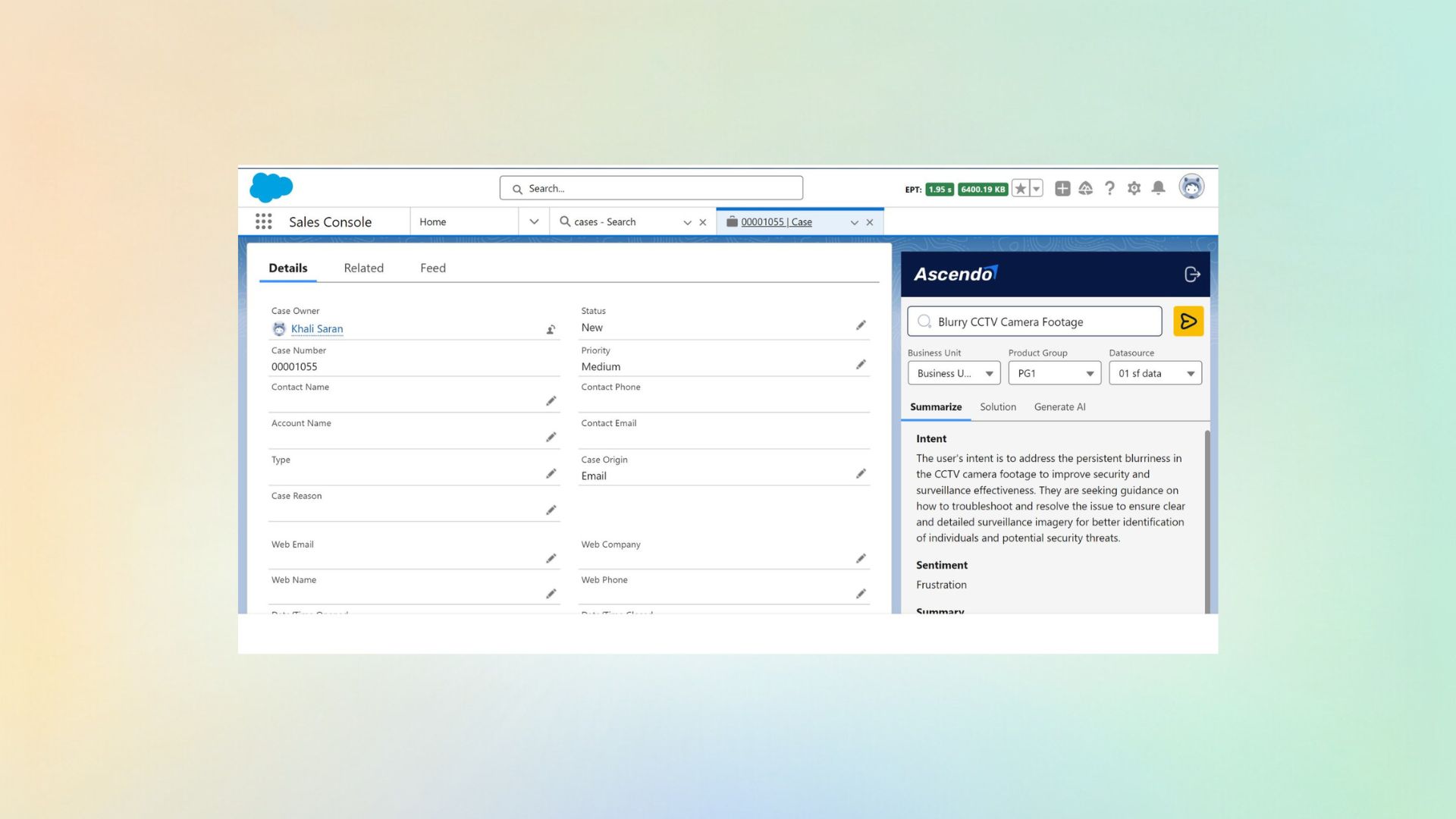
Ascendo working inside Salesforce Service Cloud. Suggested resolutions, related history and drafted responses in the case record your agents already have open — no second tab, and nothing to copy between systems.

  • Assistance inside the case record, not a second tool
  • Grounded in your own closed cases and documentation
  • Drafts the agent edits and approves
  • Salesforce stays the system of record

Watch the full tour

Verify your work email once and every research paper, case study and product tour on ascendo.ai opens, right here, without leaving the page.

  • Takes about 30 seconds
  • Work email only, no spam

The context is already in the CRM. The answer is not.

Salesforce knows a great deal about your customer: who they are, what they bought, what they have contacted you about. What it does not know is how to fix the thing in front of the agent.

So the agent joins customer context to the technical answer by hand, on every case, all day. Anything that solves this by adding a second application makes it worse: three places instead of two, and the first tab closed when the queue builds up.
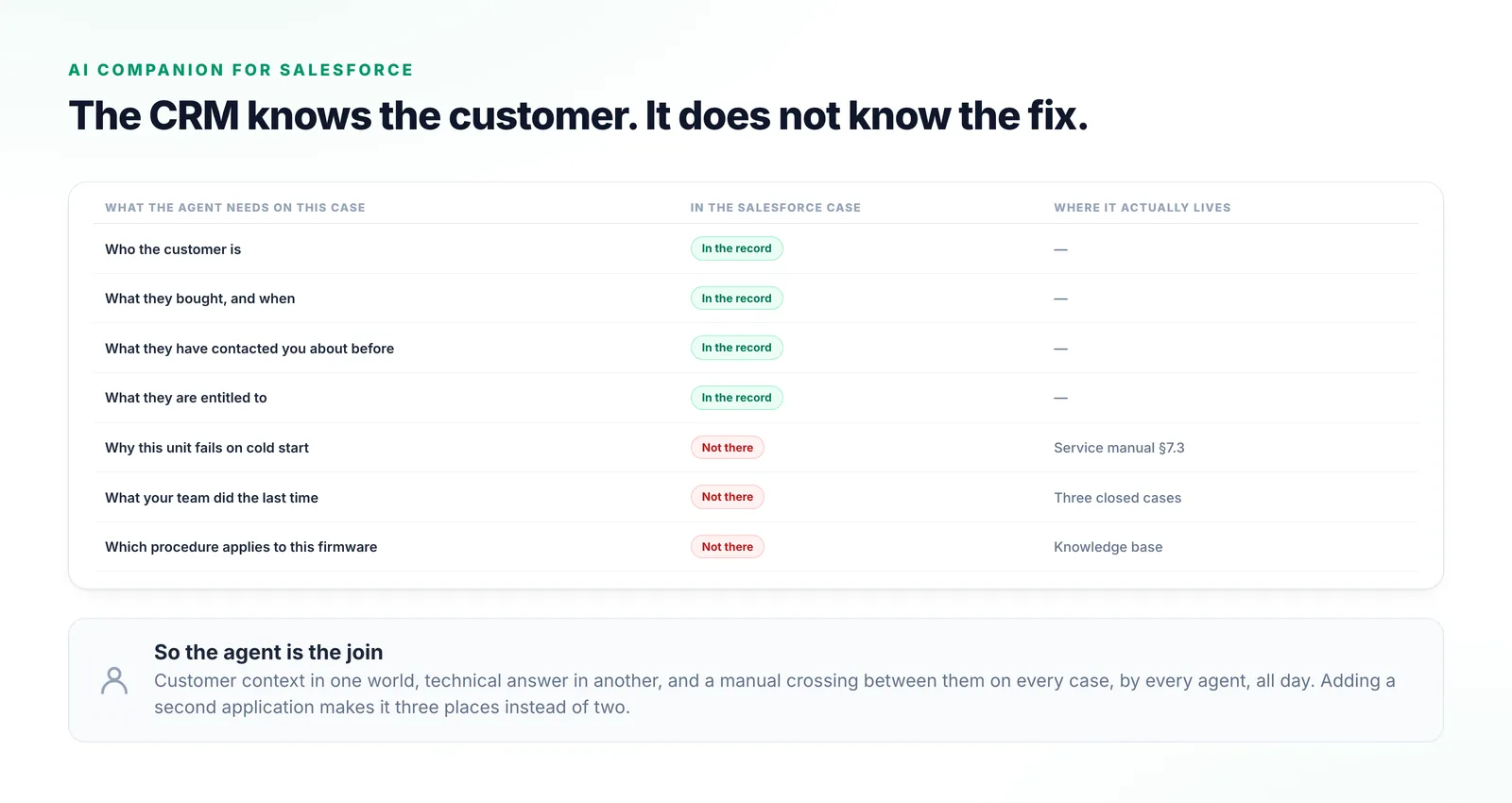
A seven-row table of what an agent needs on a case, showing four items already in the Salesforce record and three that are not, with the manual, closed cases and knowledge base where each actually lives.
Four of the seven things an agent needs are in the case. The three that decide the fix are somewhere else.

What sits behind a suggestion

The agent stops being the integration point between the CRM and the technical answer.

  1. Step 1

    Your closed cases are indexed

    Resolved cases and the notes attached to them are read in, so the system knows how your team has actually solved things.

  2. Step 2

    Joined to your documentation

    Those cases are reasoned over together with service manuals, knowledge articles and anything else you have connected.

  3. Step 3

    Surfaced in the case

    The likely resolution, similar cases and a drafted response appear against the record, with sources attached.

  4. Step 4

    The agent decides

    Nothing reaches a customer without approval, and what agents accept or edit feeds the next suggestion.
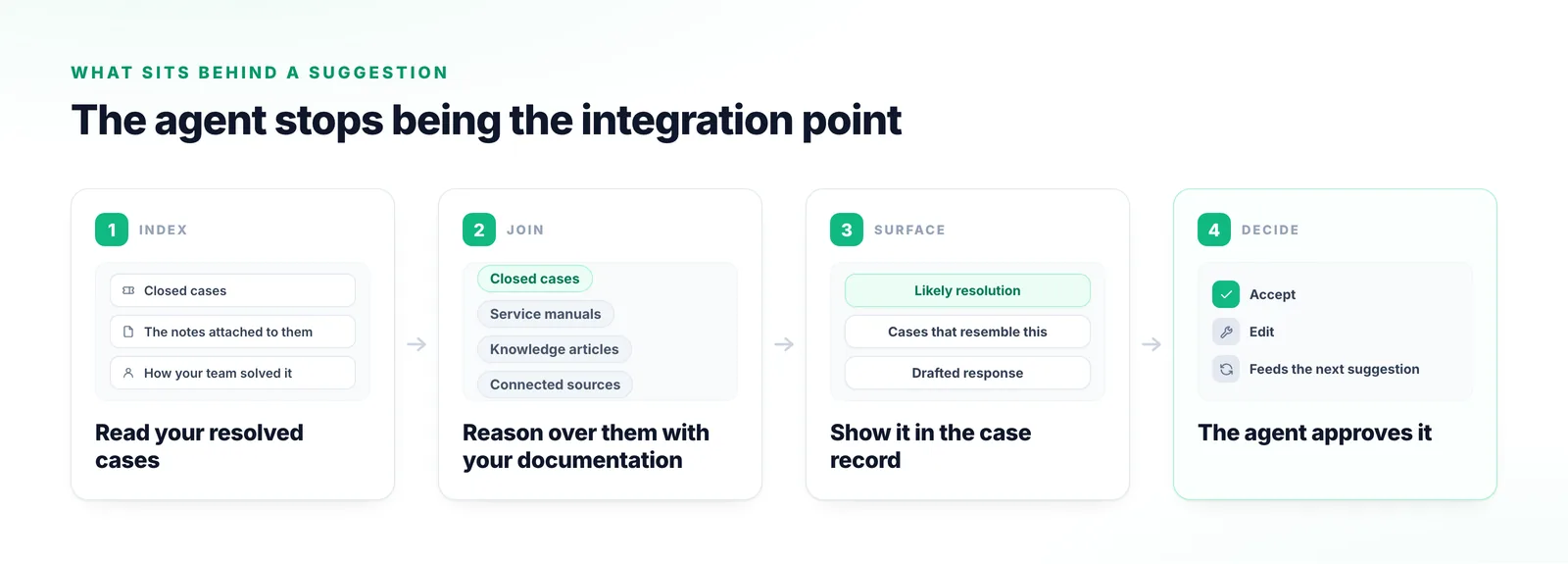
Four stages from indexing resolved cases, through reasoning over them together with manuals and knowledge articles, to a resolution surfaced in the case record and approved by the agent.
The join happens at stage two — the step an agent currently performs by hand on every single case.

What changes for a Salesforce team

One of these decides adoption and the other two decide whether the answers are any good.

No second tab

Assistance appears in the case your agent is already in. It sounds small, and it is the biggest single determinant of whether an AI layer is still used six months later.

Customer context and technical answer in one place

Salesforce holds the account, history and entitlement; Ascendo holds the resolution. The agent stops being the manual join between them.

Grounded in your closed cases

Suggestions are built from work your own team did, which is what makes them specific to your products and your customers.
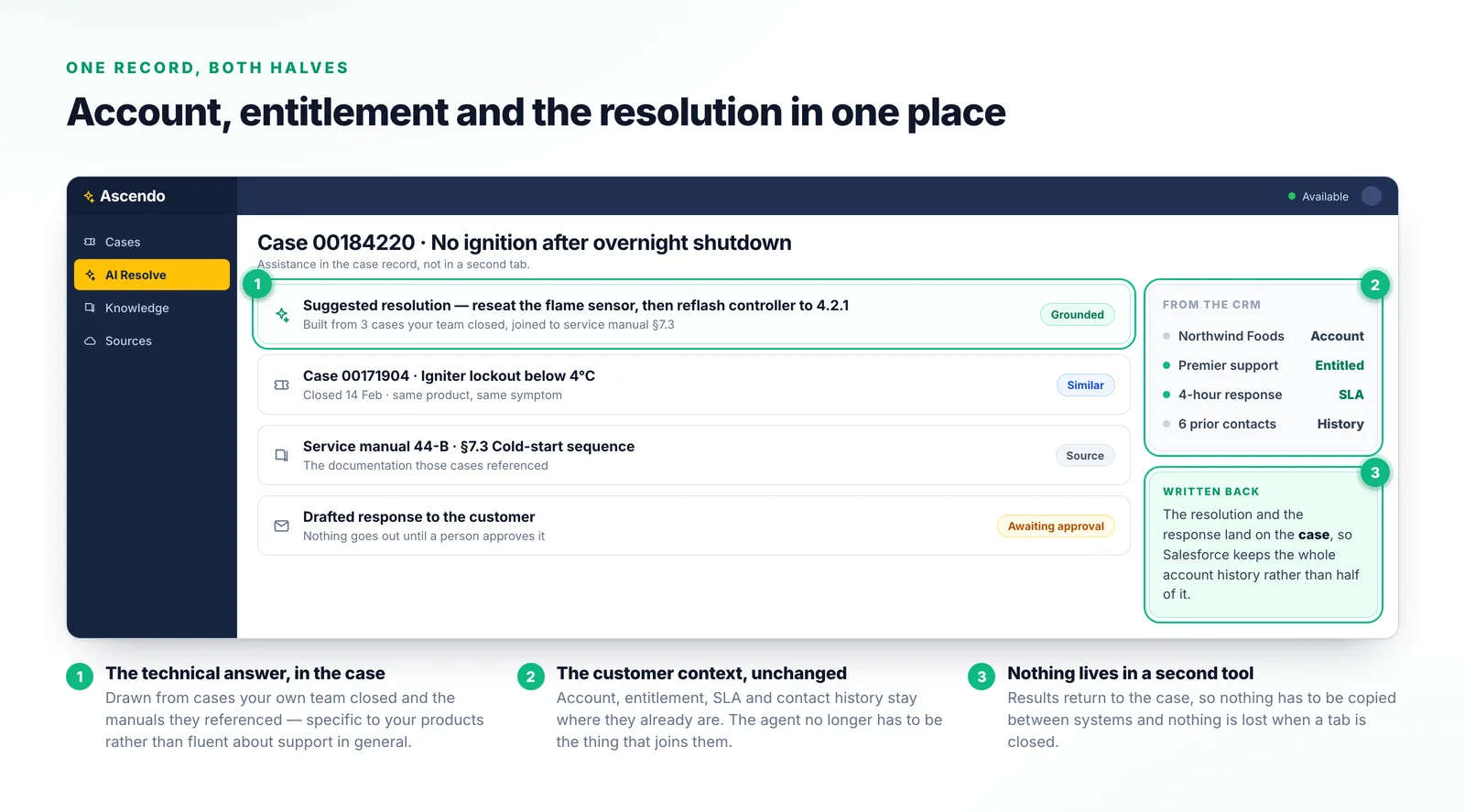
A case record showing a suggested resolution with its sources, a similar closed case, a drafted response awaiting approval, and a rail carrying the account, entitlement, SLA and contact history.
Entitlement and contact history on the right, the technical resolution on the left, in one record.

Why the usual approaches fall short

Every one of these leaves an agent joining the customer context to the technical answer by hand.

A standalone AI console beside Salesforce

The agent leaves the case to use it and pastes the result back.

A general assistant with no access to your cases

Fluent and generic. It has never seen your products or the cases you closed last quarter.

Knowledge base search inside Salesforce

Returns articles matching the words in the case, leaving the judgement exactly where it was.

Writing more knowledge articles

Worth doing, and it does not solve retrieval. The article that would have helped usually already existed.
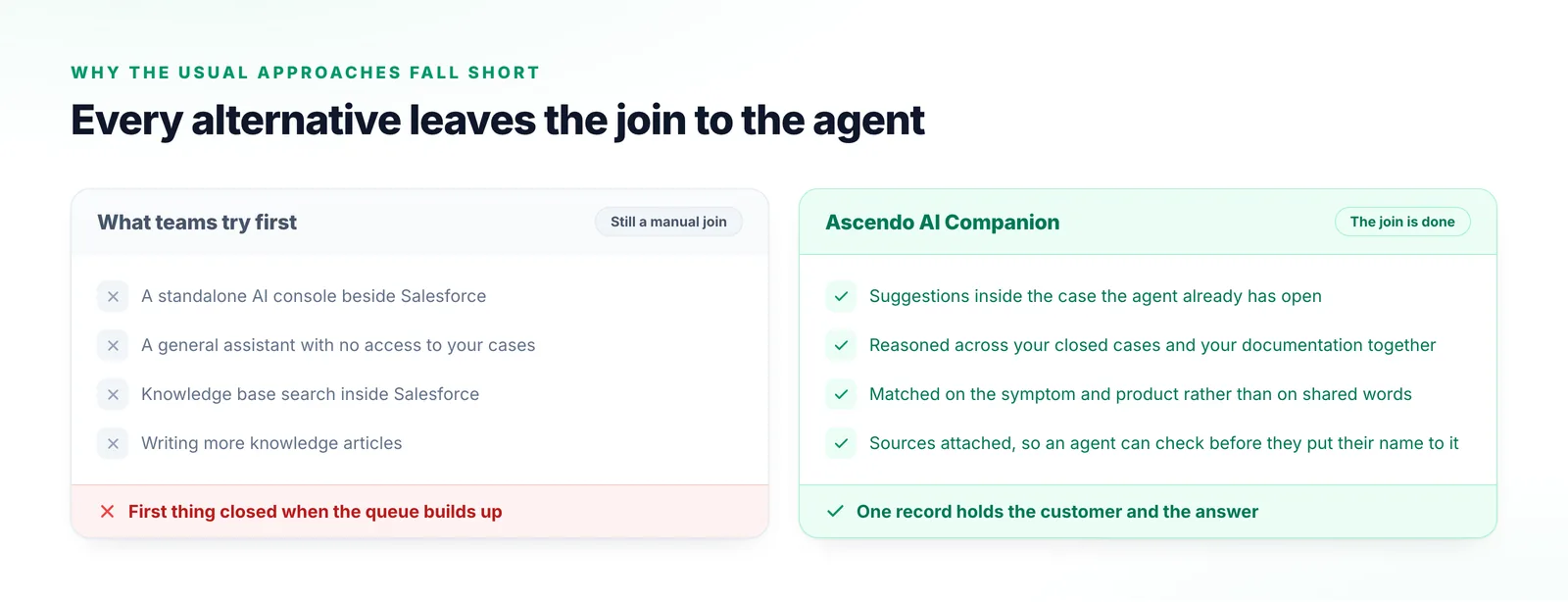
Two columns comparing standalone consoles, general assistants and knowledge base search with assistance that appears inside the case.
Everything in the left-hand column still ends with an agent copying between systems while a customer waits.

What things are called

Where the Salesforce vocabulary and the Ascendo vocabulary meet.

Case
The Salesforce record an agent works. Ascendo attaches to it rather than replacing it.
Service Cloud
The Salesforce product your support team works in day to day.
ResolveGPT
Ascendo’s resolution capability surfacing real-time recommendations inside the platform an agent is already using.
Grounding
Restricting what the system answers from to your own documentation and resolved cases.
Write-back
Returning an Ascendo result into the Salesforce record so it stays complete.

Frequently Asked Questions

No. Suggested resolutions, related cases and drafted replies appear against the case record they already have open, so there is no second console and nothing to copy between systems.

Resolution Agent

Run it against your closed cases

The quickest test is on cases you have already resolved, where you know the answer. Send us a representative sample and we will show you what would have been suggested.

Talk to us