Smart Inbox
Employee AI agents in one place across all interactions with your customers.
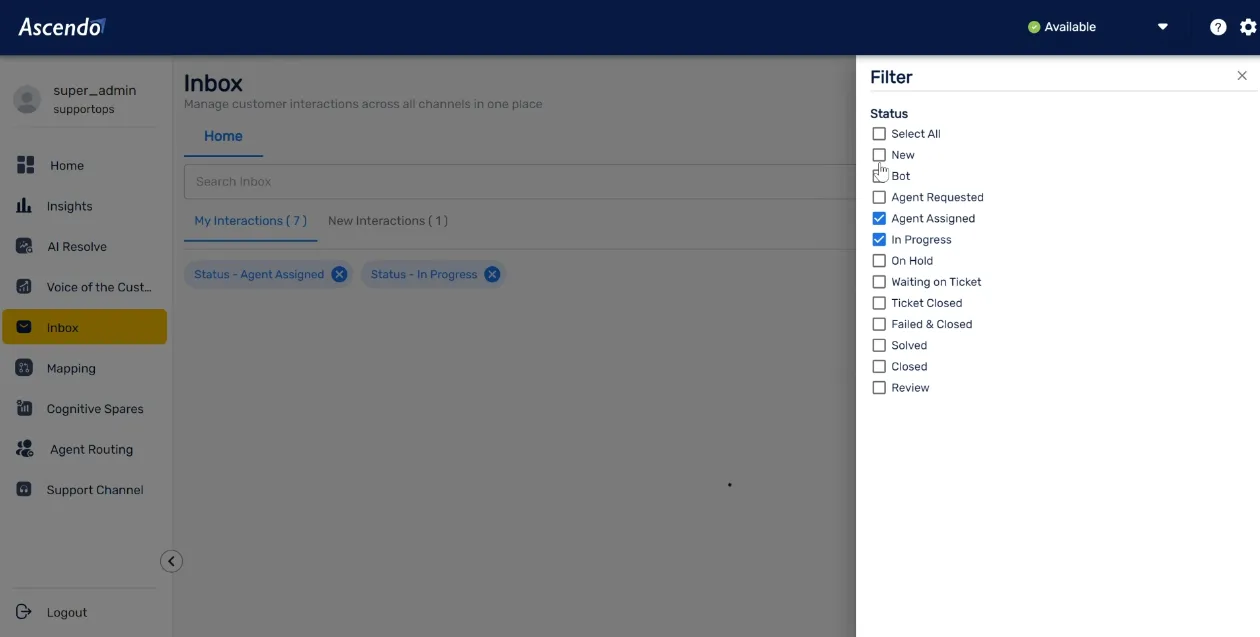
AI-Powered Inbox: Uniting Knowledge and Workflows for Unmatched Efficiency
Discover how the AI-driven Inbox bridges systems of engagement and record, seamlessly combining knowledge and workflows to enhance productivity and streamline operations.
With intelligent automation, it empowers teams to stay organized, make informed decisions, and achieve faster outcomes. Regardless of where your data resides, the Inbox integrates effortlessly, ensuring efficiency and clarity in every interaction.

Enterprise Capabilities
The Smart Inbox isn't just a place to read messages. It's an intelligent command center for your entire support operation.
Unified Channel Management
Manage email, chat, social, and phone interactions in a single, AI-orchestrated interface.
Automated Categorization
AI automatically tags and prioritizes incoming requests based on urgency and sentiment.
Contextual Knowledge
Relevant knowledge articles and past resolutions are served instantly alongside every interaction.
Intelligent Routing
Requests are routed to the best-fit agent based on skill set, workload, and historical performance.
Collaborative Workspaces
Internal teams can collaborate on complex cases without leaving the inbox environment.
Built-in Governance
Ensure all communications meet compliance standards with automated PII filtering and audit logs.
Frequently Asked Questions
What is an AI-powered inbox and how is it different from a shared mailbox?
A shared mailbox routes emails to a queue. An AI-powered inbox actively reads every incoming request, categorizes it by issue type and urgency, surfaces relevant knowledge articles and past resolutions alongside it, and routes it to the best-fit agent based on skill and workload. Agents arrive at each case already briefed, not starting from zero.
Which channels does Smart Inbox consolidate?
Smart Inbox unifies email, chat, social, phone, and portal-submitted requests into a single AI-orchestrated interface. Regardless of which channel a customer uses, the request lands in the same queue with the same contextual intelligence applied, so no interaction falls through the cracks.
How does the automated categorization work?
Smart Inbox uses NLP and ML to analyze the content and sentiment of every incoming request. It assigns issue type, urgency level, and priority tags automatically without requiring agents to manually sort or label tickets. This removes the triage bottleneck that typically adds hours of delay to first-response times.
How does Smart Inbox handle compliance and PII?
Built-in governance applies automated PII filtering to every inbound message before it reaches an agent or AI model. All interactions are logged with a full audit trail, meeting the compliance requirements of regulated industries including MedTech, financial services, and enterprise IT.
Can teams collaborate on complex cases directly inside Smart Inbox?
Yes. Smart Inbox includes collaborative workspaces where internal teams can discuss, escalate, and resolve complex cases without switching to a separate tool. All activity is captured in context alongside the customer thread, so nothing is lost when a case changes hands.
Get started with
Ascendo Today
Contact UsFrequently Asked Questions
What is Smart Inbox?
Smart Inbox is Ascendo's omni-channel intake agent, the intelligent front door to your service organization. It captures, structures, and categorizes inbound requests from email, chat, portals, and IoT devices, then routes each one to the right agent mesh automatically.
How does Smart Inbox reduce manual triage?
It recognizes the intent and urgency of every incoming message, creates and tags the ticket, and triggers the correct downstream agent, cutting manual triage time by up to 90% and giving customers near-instant responses.
What channels does Smart Inbox support?
Email, chat, customer portals, and IoT alerts. It identifies the asset and issue from context, even a vague message like "the machine is making a weird noise again," and categorizes it for the correct resolution workflow.