Resolution Agent

Intelligent Search

Everyone else puts knowledge in your technicians’ back pockets. Knowledge is still a stack of documents somebody has to interpret standing in front of the equipment. Ascendo puts an expert there instead: it reasons across every manual, ticket and service record you hold and comes back with the likely cause, the step to try, who has fixed it before and the part they will probably need.

  • Reasons across manuals, tickets and service records at once
  • Surfaces the likely cause, the part and the person who has solved it
  • Tuned by your own technicians, so it learns your equipment
  • Every recommendation traceable to where it came from

Watch the full tour

Verify your work email once and every research paper, case study and product tour on ascendo.ai opens, right here, without leaving the page.

  • Takes about 30 seconds
  • Work email only, no spam

Knowledge in the back pocket is not the same as an expert in it

The whole industry has settled on the same promise: put all the knowledge in the technician’s pocket. But a document is not a decision. Six relevant manuals, spread across a CRM, a ticketing system, a wiki and old email threads that do not talk to each other, is still homework.

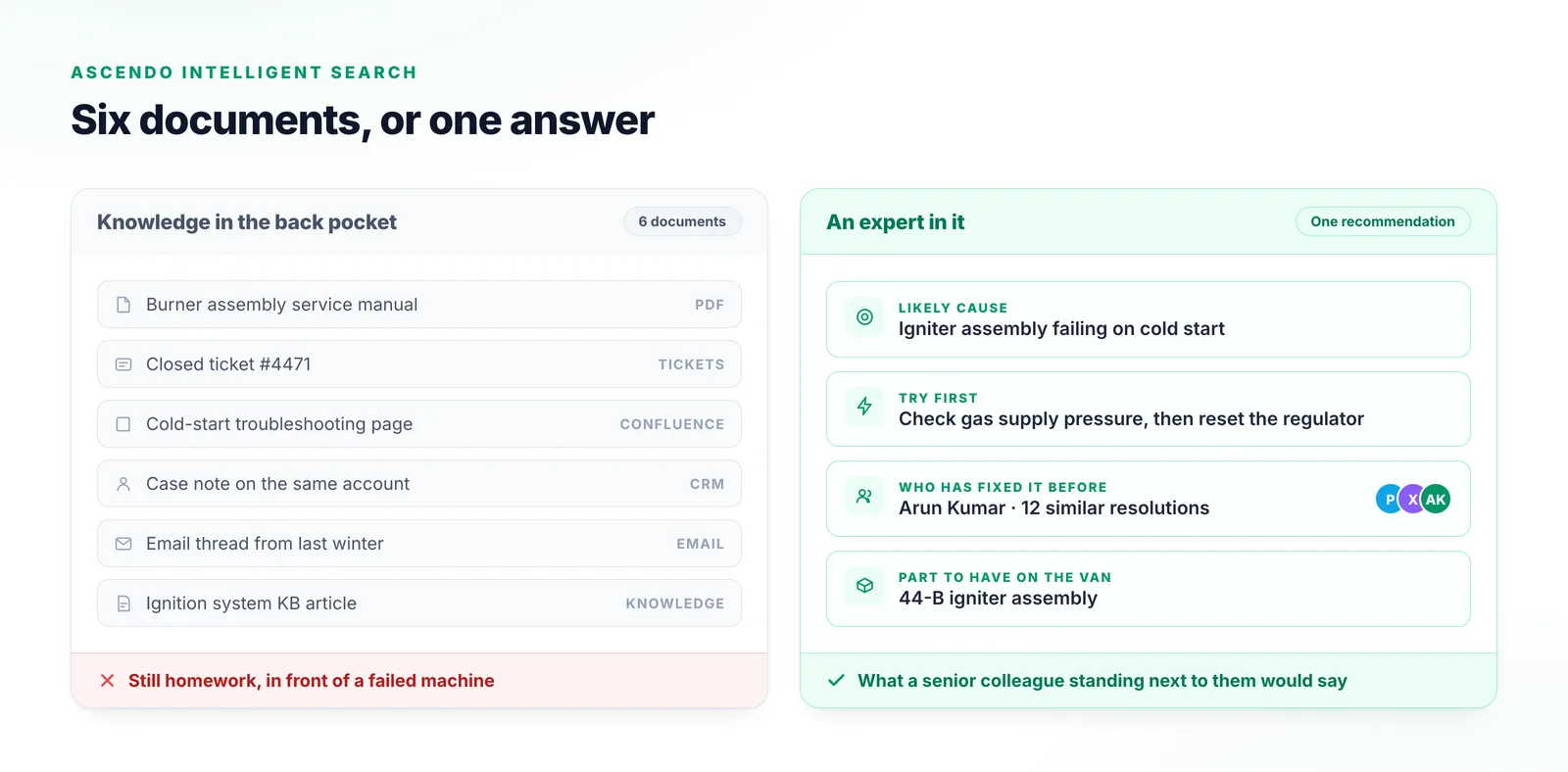
What they want is what a senior colleague standing next to them would give: the likely cause, the step worth trying first, who has seen this before, and which part to have on the van. That is a different job from returning a search result.

Six service documents handed to a technician on one side; on the other, Ascendo returning the likely cause, the step to try first, the technician who has fixed it before and the part needed.
The same gas ignition fault, two ways. Six relevant documents is still homework; a likely cause, a next step, a name and a part is an answer.

How it gets to a recommendation

The recording follows a real gas ignition fault the whole way, in about two minutes.

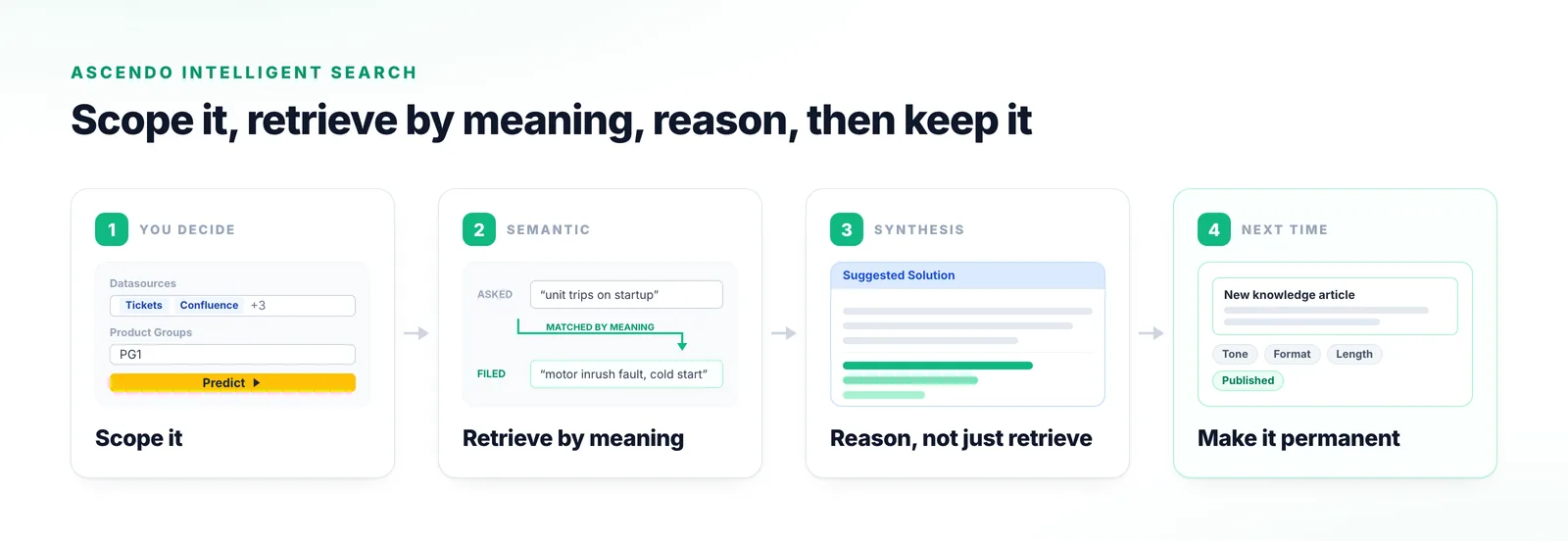
  1. Step 1

    Scope it

    Describe the problem, then choose the data sources and product groups in play — before the agent starts.

  2. Step 2

    Retrieve by meaning

    It analyses content rather than matching keywords, so a fault described one way reaches a fix written up in other words.

  3. Step 3

    Reason, not just retrieve

    Not a reading list: a plain-language summary of the resolutions worth trying, with the ranked sources underneath.

  4. Step 4

    Make it permanent

    Rephrase it by tone, format or length, then pass it to the Knowledge Agent to publish.

Four stages of the Ascendo Search Agent: scoping by datasource and product group, semantic retrieval across differing vocabulary, a suggested solution over ranked sources, and publishing the result as new knowledge.
Scope the query, retrieve by meaning rather than by keyword, reason over what comes back, then keep the answer as knowledge for the next person.

What an expert gives you that a search box cannot

Three capabilities a general-purpose enterprise search has no way to produce against equipment data.

It knows who has fixed this before

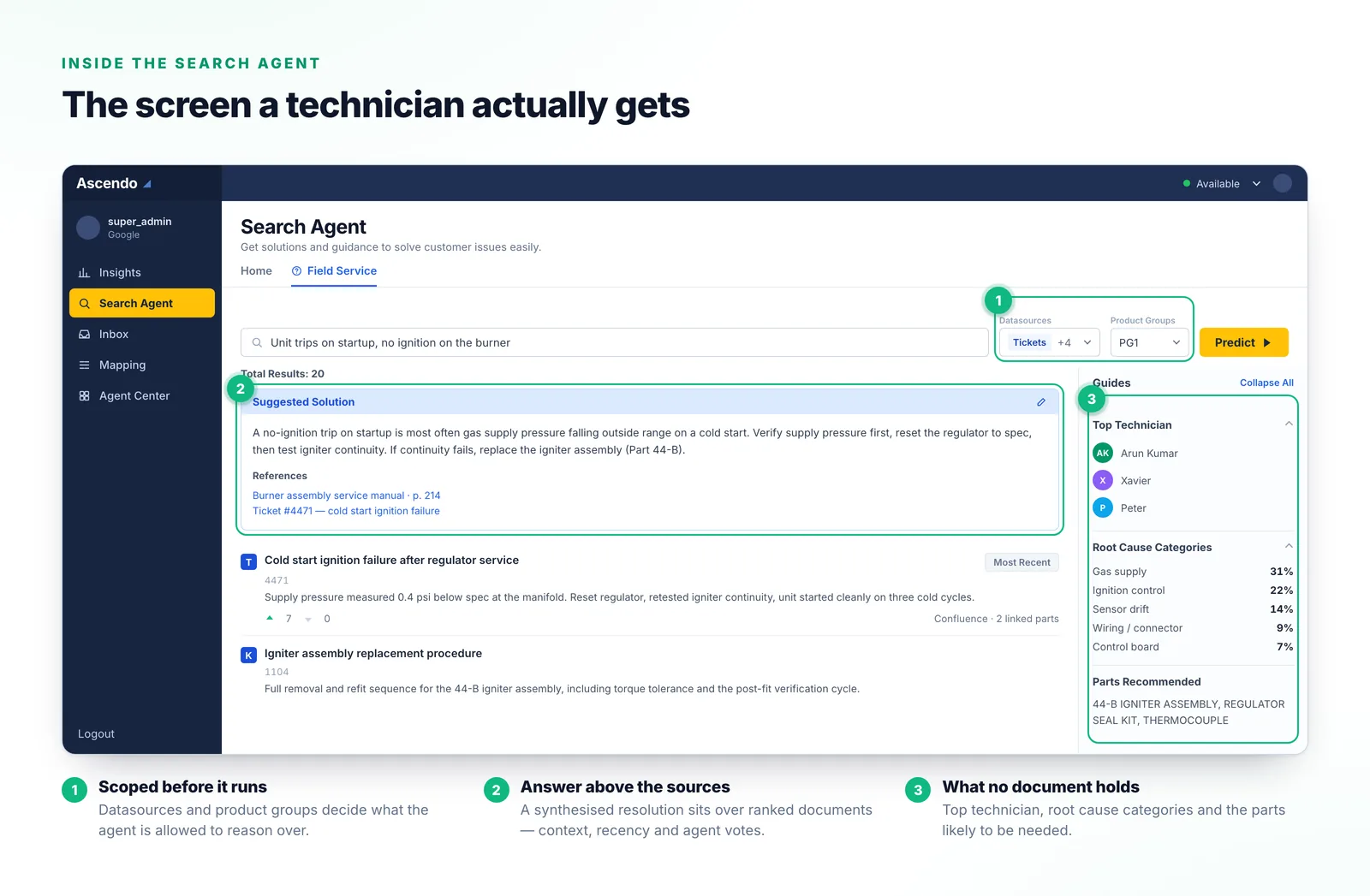
Top technician surfaces the most experienced people for this issue, parts recommended the replacements likely needed, and root cause categories the underlying source rather than the symptom. None of that is retrievable from documents alone — it needs an install base, a skill matrix and parts data.

The top technician feature highlights the most experienced experts available for support.
From the tour

It gets better at your equipment specifically

Results are ordered by context, by date of creation, and by feedback from the agents who used them. Your technicians do the tuning, so it converges on your vocabulary and your failure modes.

The documents are ranked from highest to lowest relevancy based on context, date of creation and agent feedback.
From the tour

A recommendation, with the receipts underneath

You get a synthesised resolution summary and the ranked documents it was built from. The summary is what to do; the documents are how you check it.

The suggested solution cuts through any technical jargon and is easy to understand.
From the tour
The Ascendo Search Agent screen: datasource and product group scoping, a Suggested Solution card above ranked results carrying a Most Recent badge, and a rail showing top technician, root cause categories and recommended parts.
The Search Agent working a gas ignition fault: the scoping controls, a synthesised answer sitting above its ranked sources, and the top technician, root cause and parts that no document holds.

Why the usual approaches fall short

Most service organisations have already tried at least two of these.

Keyword or knowledge base search

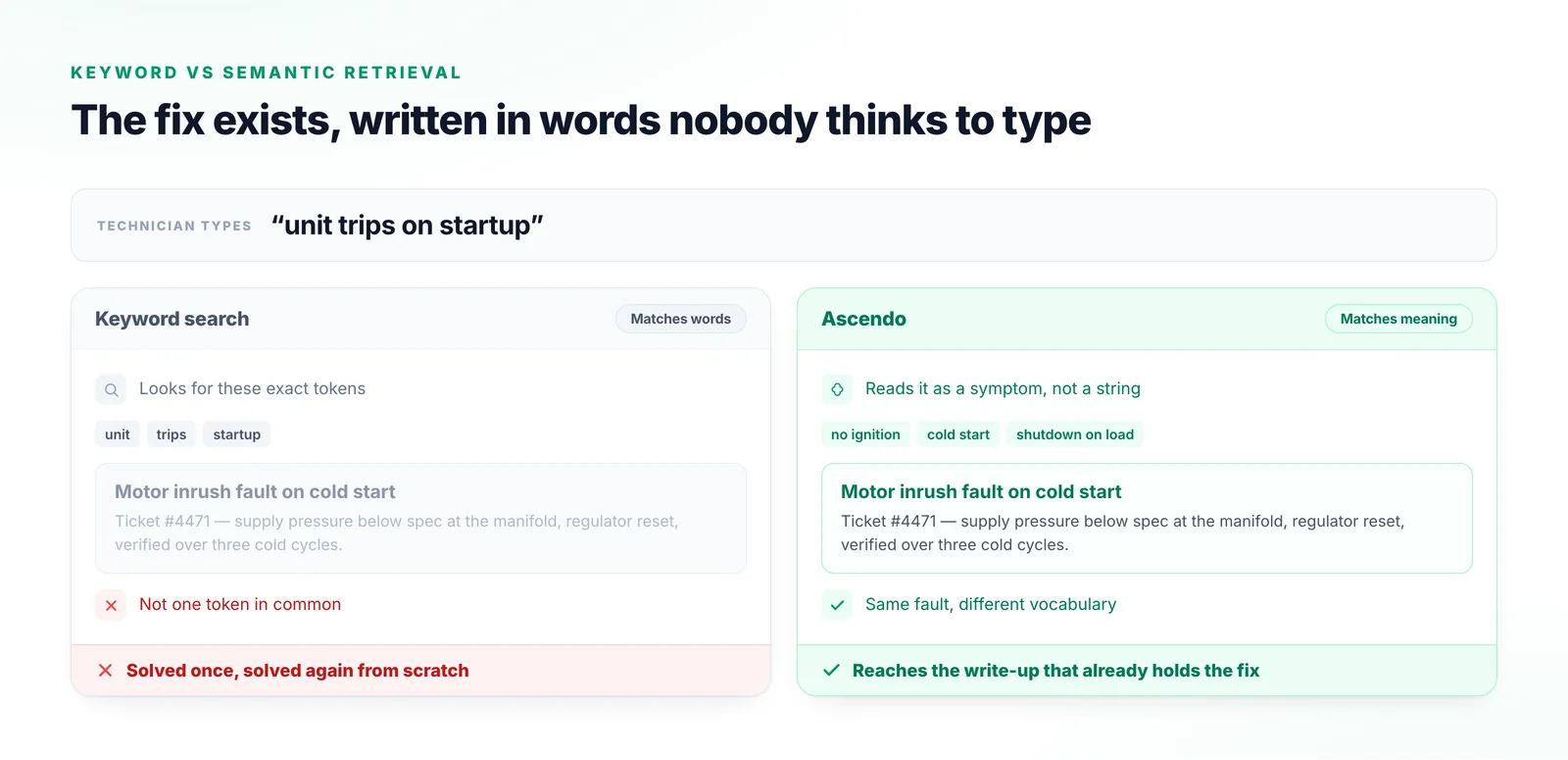
Fails the moment terminology drifts, which is constantly. The fix exists, written in words nobody thinks to type.

Generic enterprise search

Indexes documents competently, but with no install base, skill matrix or parts data it can never produce a top technician or a recommended part.

A general-purpose chatbot pointed at your docs

No source attribution, no feedback loop and no product-group scoping. Nothing improves over time and nothing can be checked.

Asking the senior engineer

Works, does not scale, and the knowledge leaves the building when they retire.

A technician searching “unit trips on startup”: keyword search shares no tokens with the write-up filed as “motor inrush fault on cold start”, while Ascendo matches the two by meaning.
Keyword search shares not one token with the write-up that already holds the fix. Matching on meaning reaches it anyway.

What things are called

Terms you will hear in the recording.

Resolution Engine
The overall diagnose-and-resolve capability. Search is its core.
Suggested Solution
The synthesised answer shown above the ranked results.
Predict
The control that runs the query.
Guided filter
Conversational narrowing of the issue for someone unsure what to ask.
Top technician
The most experienced people available for this kind of issue.
Most Recent
The badge on the newest highly ranked result.
Data source and product group
The scoping controls that decide what a given query is allowed to search.

Frequently Asked Questions

Conventional search matches words and returns documents. This matches meaning and returns a recommendation, so a fault described as a unit tripping on startup can reach a write-up filed as a motor inrush fault on cold start even though the two share no vocabulary, and what comes back is the resolution to try rather than a list to read.

Intelligent Search

Run it against a fault your team argues about

Pick a problem that keeps coming back and we will show you what Ascendo surfaces from your own documentation and ticket history.

Talk to us