Data Integration

PDF Parser

The procedure a technician needs is rarely in one place. Part of it is in the service manual, part in a spec sheet, and the decision tree is a flowchart three hundred pages in with no text under it at all. Ascendo works across the whole library at once and assembles the sequence, with every step traced to the page it came from.

  • Works across your whole library, not one file at a time
  • Reads flowcharts and schematics that have no text layer
  • Finds a part number mentioned once, hundreds of pages in
  • Every step traced back to its source page

Watch the full tour

Verify your work email once and every research paper, case study and product tour on ascendo.ai opens, right here, without leaving the page.

  • Takes about 30 seconds
  • Work email only, no spam

The procedure exists. It is scattered, and half of it is a picture.

Almost nothing a technician needs lives in one section of one document. The sequence, the tolerance, the part number and the decision tree sit in four different places, and reassembling them falls to a person while a customer waits.

The flowchart is the hard part: no text layer, so nothing to search. Tools that read a document as a wall of text skip it, or invent something plausible that was never there. The documentation was never the problem — putting it back together was.

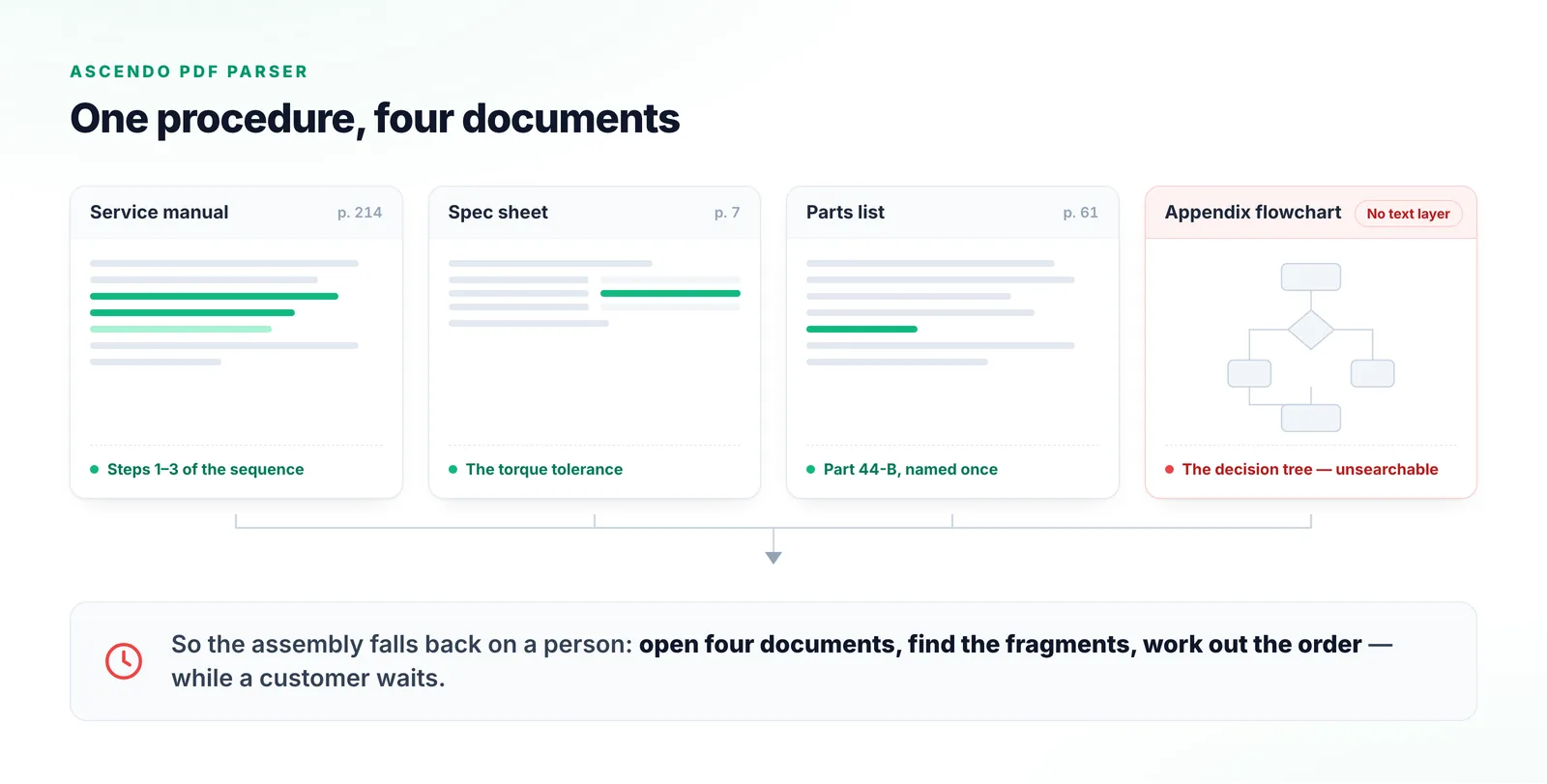
Four service documents — a manual, a spec sheet, a parts list and an appendix flowchart — each holding one fragment of a single repair procedure, with the flowchart marked as having no text layer.
One procedure, four documents. The decision tree in the appendix is an image, so plain text extraction has nothing underneath it to search.

From a shelf of manuals to a working procedure

The value is not looking one thing up. It is assembling steps that were never written down in one place.

  1. Step 1

    Connect the library once

    Upload or connect once in the Integration Wizard, then map each source to its product group. The corpus stays indexed.

  2. Step 2

    Search every source, not one file

    One request runs across every connected source at once, blending semantic, keyword and visual retrieval.

  3. Step 3

    Read what has no text

    Flowcharts, schematics and tables are understood visually at ingest, so image-only steps stay retrievable.

  4. Step 4

    Assemble the sequence

    The fragments come back as one ordered procedure, each step carrying the page it came from.

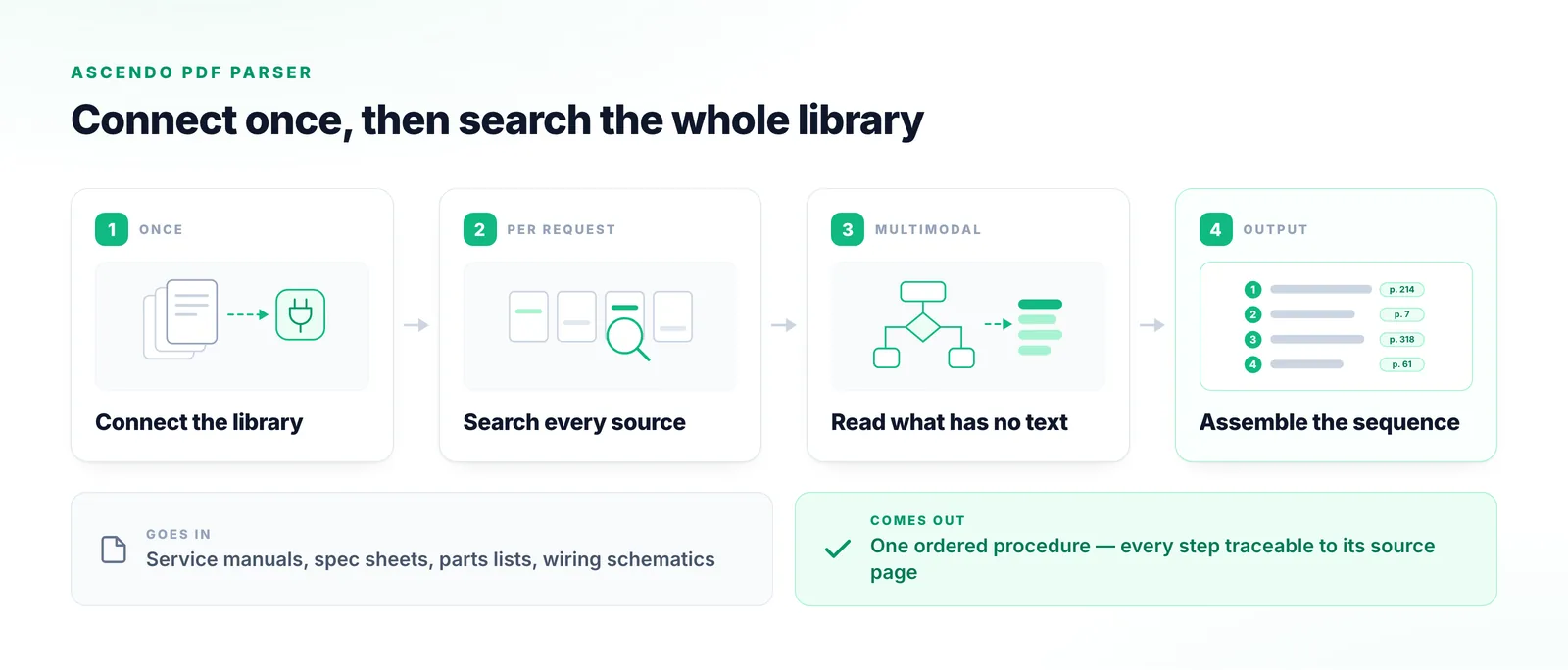
The four-stage Ascendo PDF Parser pipeline: connect the library, search every source, read diagrams that carry no text layer, and assemble an ordered procedure with a source page on each step.
The third stage is the one plain text extraction cannot reach: a decision tree that exists only as an image, still returned as a step.

Three things a text-only tool structurally cannot do

Not better search over the same content. Access to content that plain extraction never reaches in the first place.

Diagrams are read, not skipped

A troubleshooting flowchart or wiring schematic often has no text layer at all. Ascendo builds a semantic understanding of every diagram, chart and table at ingest, so those steps can be retrieved and explained rather than guessed at.

“Allows users to go to the exact section where the solutions come from and provides quick view such as tables, images, etc.”
From the tour

Scattered sections become one procedure

When the answer is spread across a dozen sections and several documents, a single-pass reader returns whichever fragment it found first. Ascendo pulls from every relevant section and assembles them into one sequence.

Every step shows its page

Each part of the procedure carries a reference that opens the exact section it came from, with a quick view of the table or image behind it. Checking it is one click.

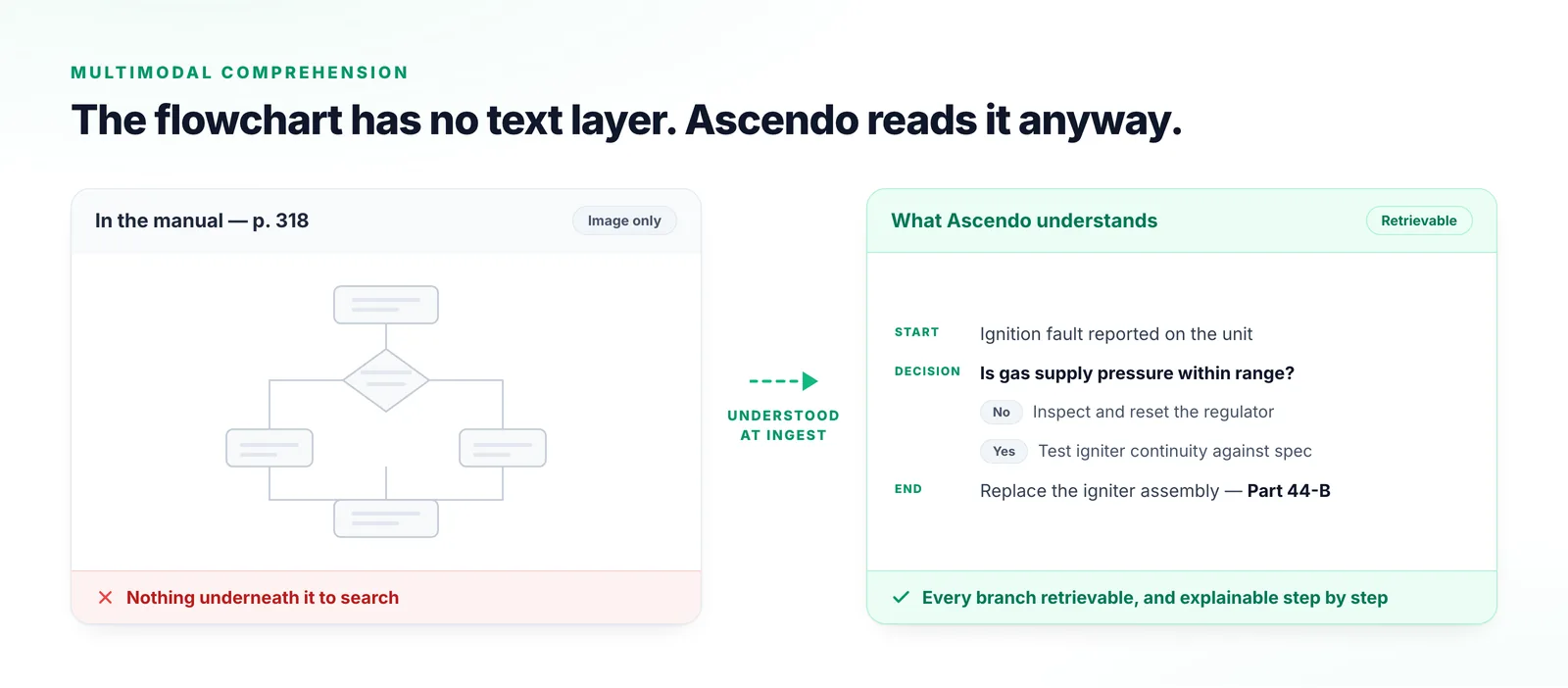
A troubleshooting flowchart as printed in a service manual, beside the same decision tree after Ascendo has read it: start condition, decision point, both branches and the closing repair step.
Left, the page as it sits in the manual. Right, the same decision tree as branches that can be retrieved, followed and explained.

Why the usual approaches fall short

Most teams have already tried at least one of these.

Full-text search or a document portal

Returns a list of documents. Someone still has to open several and work out the order.

Uploading a PDF to a general AI assistant

Reads the document as a wall of text, so image-only flowcharts are skipped. It answers from one section, and the file is re-uploaded every conversation.

Manually authored knowledge articles

Accurate the day they are written. They do not scale, and they go stale on the next revision.

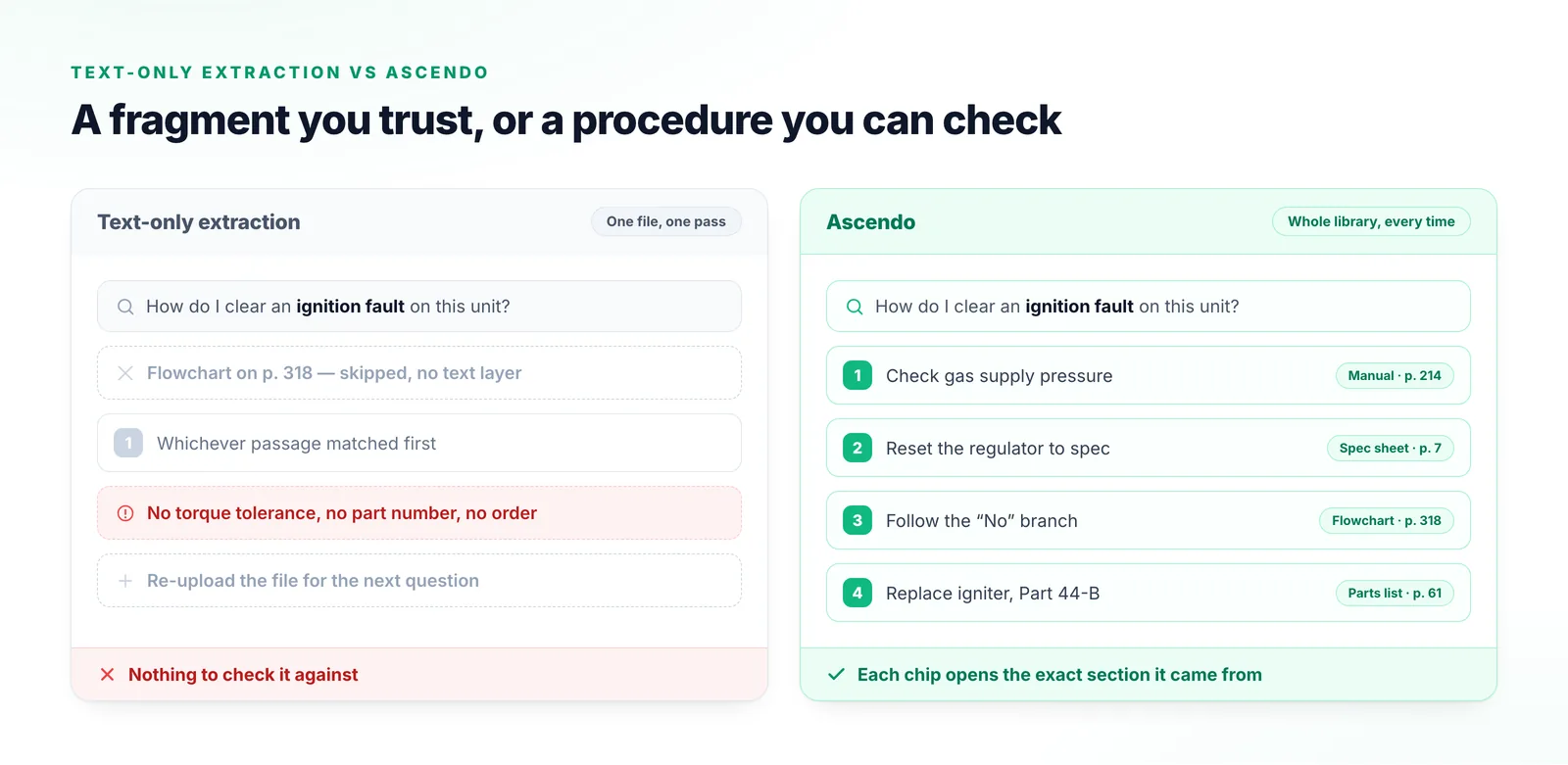
A text-only PDF reader returning a single unsourced fragment and skipping the flowchart, beside Ascendo returning a four-step procedure with a page citation on every step.
The same question, put to a text-only reader and to Ascendo across the whole connected library. Each citation chip opens the exact section its step came from.

What things are called

The vocabulary used in the recording, in case you are watching it with someone who has not seen the platform.

Connect
The data integration agent where documents are added, processed and managed. Files live here, not inside the assistant.
Integration Wizard
The connect-or-upload step where a document source is added.
Mapping
Associating a source with products or product groups. It also decides who can see the document.
Product group
The tagging and permission scope a document belongs to.
Data source
A connected corpus, selectable as a filter at the point of a request.
Knowledge vectors
The internal index Ascendo builds while comprehending a document.
Multimodal
Text, voice and images understood together rather than one at a time.
Omnichannel
The channels you interact with customers through: email, phone, Slack or Teams, website, training portal, customer portal and knowledge portal.
AI Resolve
The pluggable Gen AI component that can be dropped into any website or portal.

Frequently Asked Questions

It ingests your service documentation into Connect, builds a semantic understanding of the text, tables and diagrams in it, and then works across the whole indexed library to assemble the procedure someone needs — not a single lookup, but the steps pulled together from wherever they were written, each carrying the page it came from.

Data Integration

Try it on your own documentation

The fastest way to judge this is with a manual of your own. Send us a representative PDF and we will show you what Ascendo can answer from it.

Talk to us