Data Integration

Privacy Filter

Anything can strip personal data out of a service record. The hard part is stripping it and still being able to diagnose the fault. The Privacy Filter finds the names, emails, phone numbers and IP addresses in your data and replaces, masks or removes them before it reaches any reasoning layer — and leaves the record usable.

  • Runs at intake, before any reasoning or storage layer
  • You choose the entities, and what happens to each one
  • Replace, mask or remove — redaction is not all or nothing
  • Test it against your own text before it filters anything

Watch the full tour

Verify your work email once and every research paper, case study and product tour on ascendo.ai opens, right here, without leaving the page.

  • Takes about 30 seconds
  • Work email only, no spam

The record has to be safe and still be readable

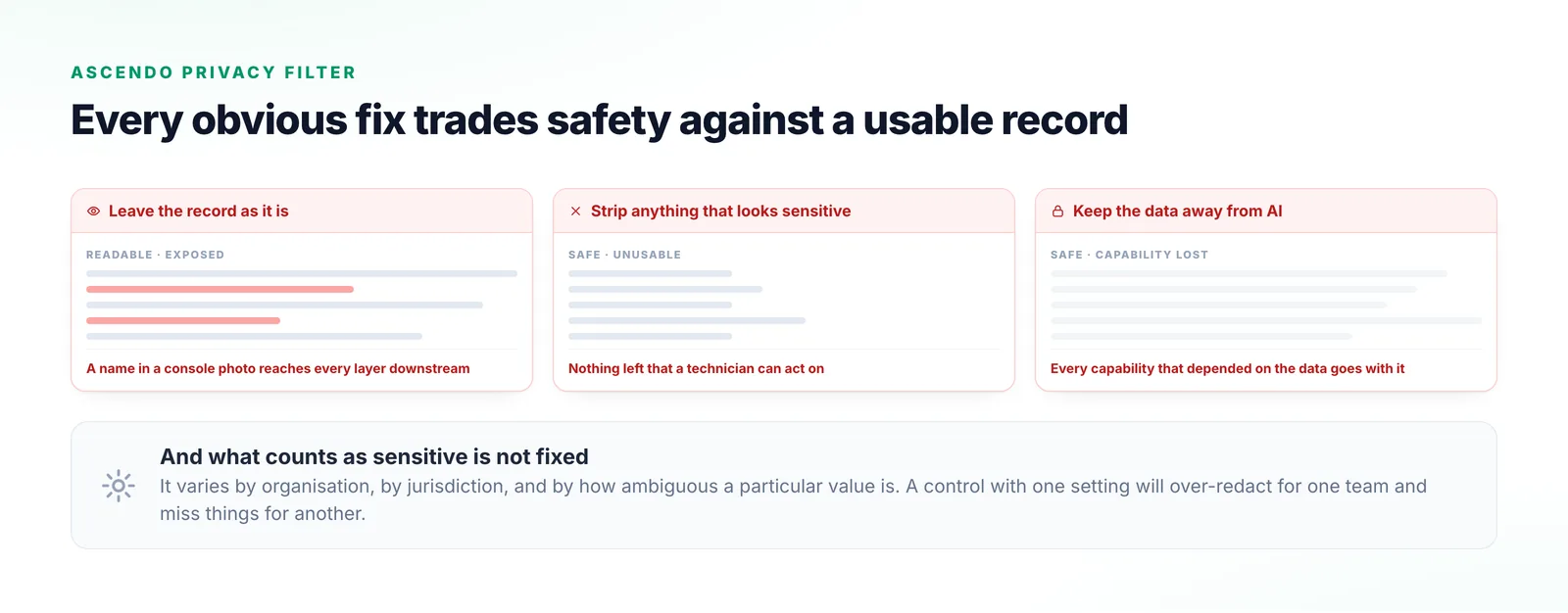
Service data is full of personal information nobody put there deliberately: a patient name in a photo of a device console, an email thread pasted into a ticket, an IP address sitting in a log line. None of it was scoped to be there, and all of it flows into whatever reads the record next.

Strip everything that looks sensitive and the fault description stops being actionable, which is why teams under real compliance pressure often keep AI away from the data entirely. What counts as sensitive is not fixed either, so a control with one setting fails in both directions at once.

Three versions of the same service record side by side: one untouched with personal data still in it, one stripped back to almost nothing, and one greyed out because AI is kept away from it entirely.
Leaving the record alone, gutting it, or keeping it away from AI: three failures a single redaction switch has to choose between.

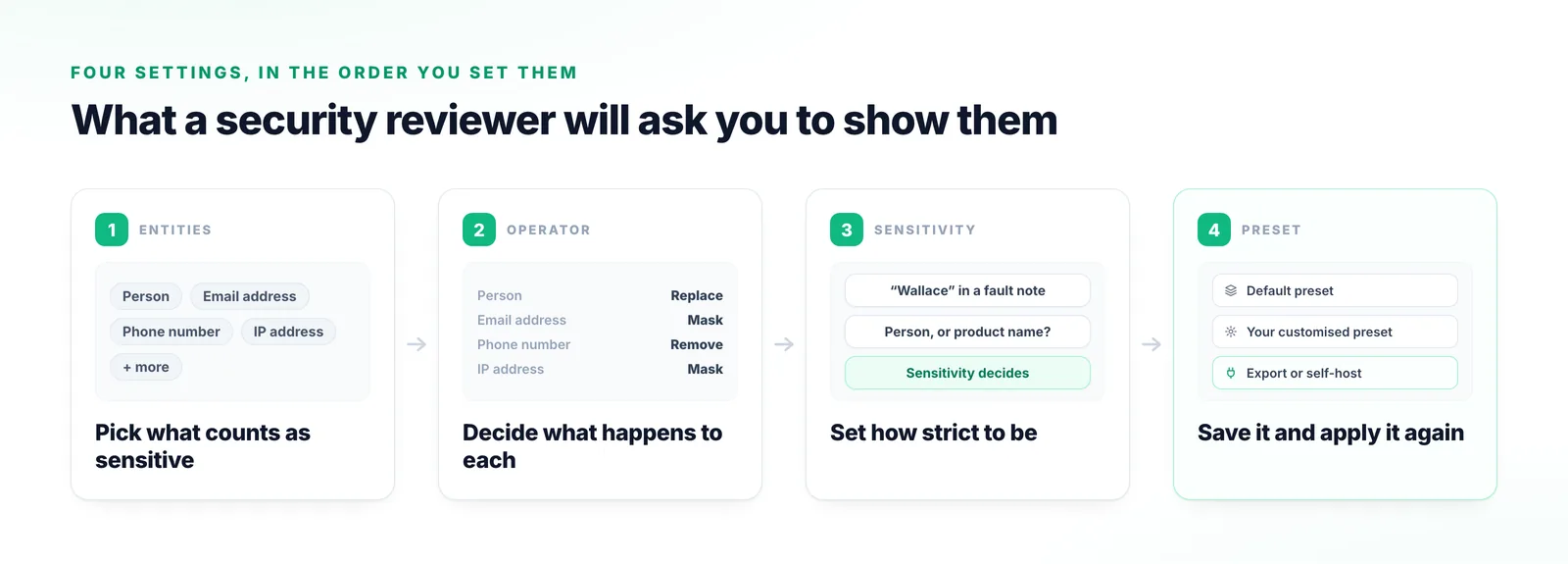
Four settings decide what happens to your data

These are the four a security reviewer will ask about. They are worth knowing by name.

  1. Step 1

    Entities — what counts as sensitive

    Which types count as sensitive. The recording picks persons, email addresses, phone numbers and IP addresses from a wide selection available out of the box.

  2. Step 2

    Operator — what happens to it

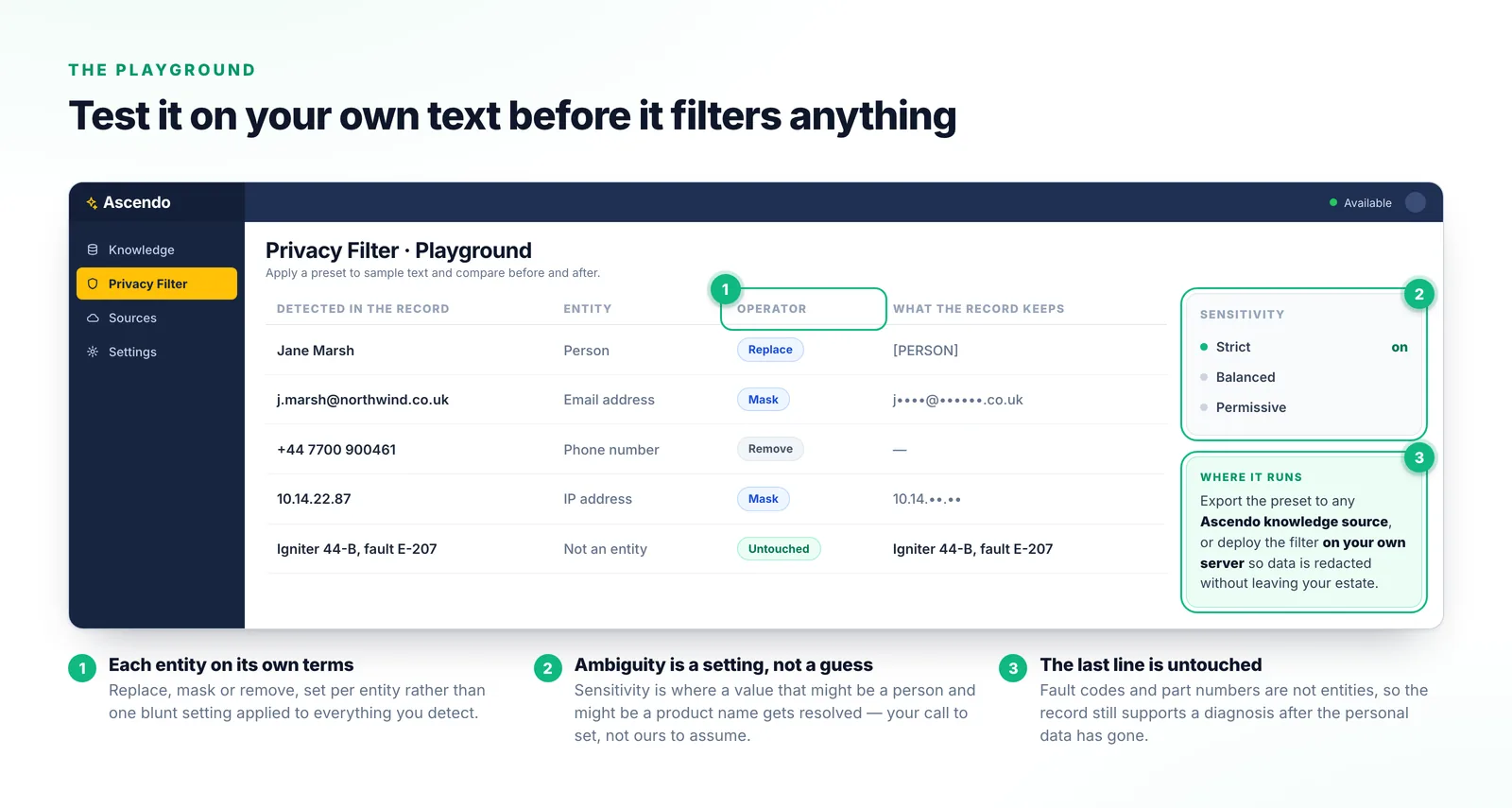
    Each entity is handled on its own terms: replaced with text you specify, masked, or removed entirely.

  3. Step 3

    Sensitivity — how strict to be

    How strict the model is about ambiguous values. It is the dial between over-redacting and letting something through.

  4. Step 4

    Preset — make it reusable

    Entities and operators bundle into a preset you can reuse, customise or export. A default ships to start from.

Four-stage diagram of the Privacy Filter settings: entity types being chosen, an operator set per entity, a sensitivity dial resolving an ambiguous name, and the result saved as a reusable preset.
Sensitivity is the third stage rather than the first, because it only matters once you have said which entities count.

Why this is a control rather than a switch

Redaction that cannot be tuned is either useless or unsafe, and usually both in turn.

The record survives the redaction

Anything can remove data. The point is that the record still supports a diagnosis afterwards, and masking is the mechanism: it keeps the shape and position of a value where removing it would leave a hole.

“Ascendo AI’s privacy filter detects and hides sensitive data like names, emails, IP addresses in your records, protecting private information without losing important context.”
From the tour

Ambiguity is a setting, not a guess

Most values are unambiguous; the interesting ones are not. Sensitivity is where you decide how a string that might be a person and might be a product name resolves.

“This helps the model’s decision-making process when encountering ambiguous entities.”
From the tour

It can run on your own server

A finished preset exports to any Ascendo knowledge source, or the filter deploys on your own infrastructure so data is redacted without leaving your estate.

“Export this preset to any Ascendo AI knowledge source or deploy the privacy filter on your server to filter sensitive information from your data.”
From the tour
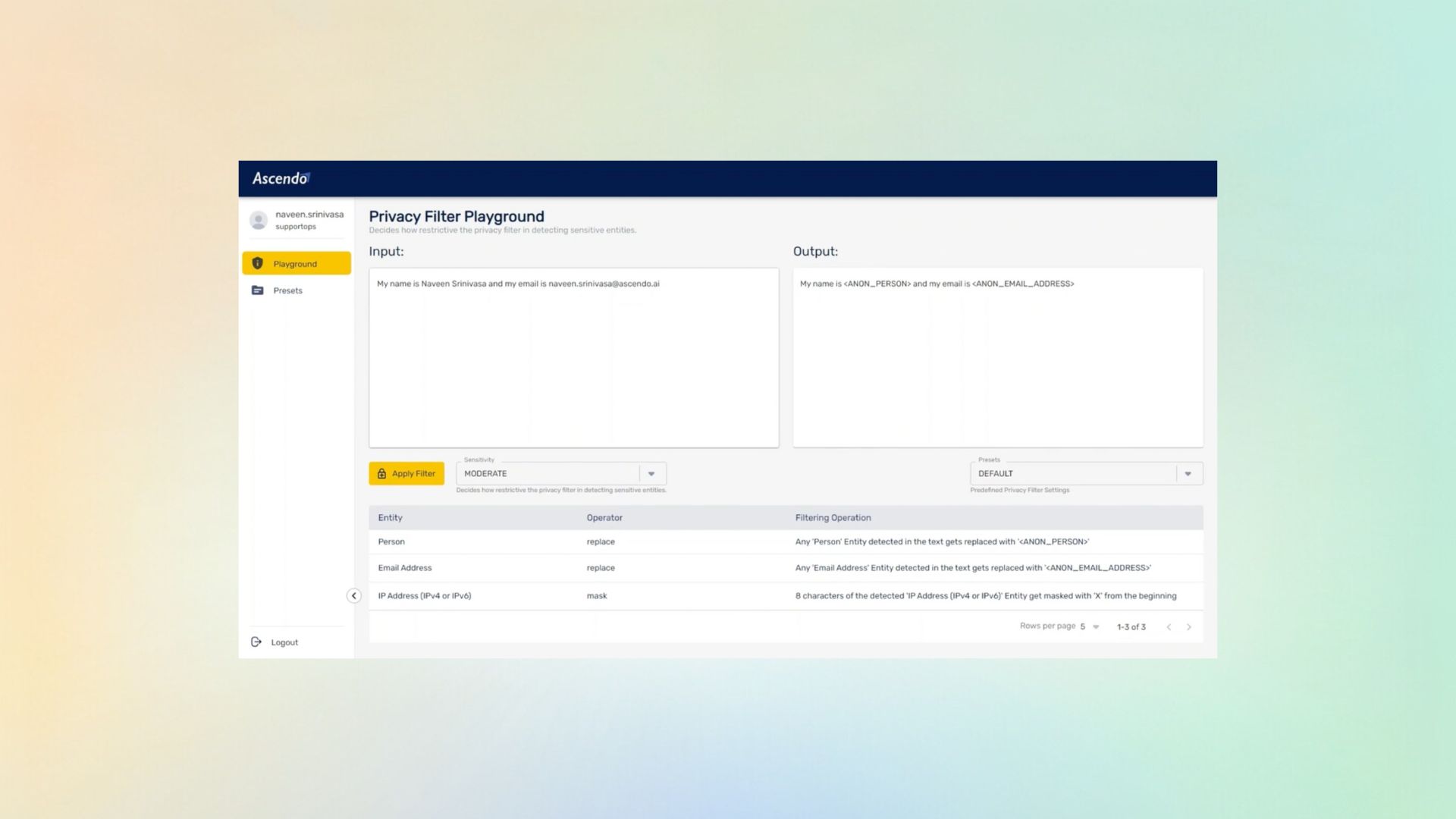
The Privacy Filter Playground listing five values found in a record with the entity type detected, the operator applied to each, and what the filtered record keeps in place of the original.
Replace, mask and remove applied to four entity types in one record, with the fault code passing through untouched.

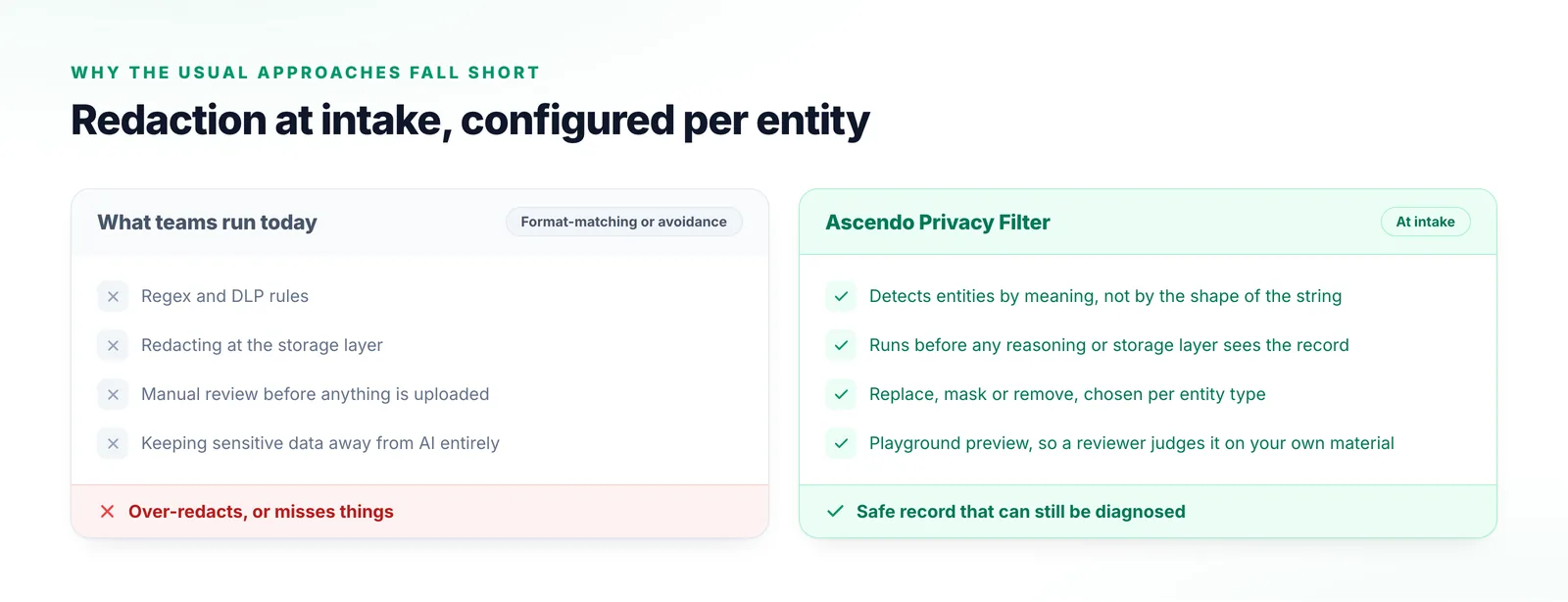
Why the usual approaches fall short

Most regulated teams have already tried at least two of these.

Regex and DLP rules

They match formats, not meaning, and cannot express an ambiguous case at all.

Redacting at the storage layer

Too late. The data has already passed through whatever read it on the way in.

Manual review before anything is uploaded

Holds up in a pilot, and not on a Tuesday with a customer waiting.

Keeping sensitive data away from AI entirely

A legitimate choice that costs you every capability depending on the data you are protecting.

Two columns comparing the redaction approaches teams run today with Ascendo’s Privacy Filter, each line marked with a cross or a tick.
Where a control sits in the pipeline is what separates these: pattern-matching after the fact, or detection by meaning at intake.

What things are called

The vocabulary used in the recording, in case you are watching it with a compliance reviewer.

Privacy Filter
The product name used throughout the recording. The agent is listed as PII Redaction.
Playground
The interactive preview where a filter is tested against sample text before it is applied to anything real.
Entity
A type of sensitive data to detect — person, email address, phone number, IP address, and many more out of the box.
Operator
What happens to a detected entity: replace, mask, or remove.
Filtering operation
The values the chosen operator needs, such as the text a detected entity is replaced with.
Sensitivity
How strict the model is when deciding whether an ambiguous value is really an entity.
Preset
A reusable bundle of entities and operators that can be applied repeatedly or exported.
PII / PHI
Personally identifiable information and protected health information.

Frequently Asked Questions

The entities you configure, handled the way you configure them. The recording targets persons, email addresses, phone numbers and IP addresses, chosen from a wide selection available out of the box, and each one is independently set to be replaced, masked or removed.

PII Redaction

Test it against your own records

The honest way to evaluate a redaction control is on your data rather than ours. Send us a representative sample and we will show you exactly what it takes out and what it leaves behind.

Talk to us